
Download Openconnect VPN Client – Secure Remote Access, Cisco AnyConnect Compatibility, Open Source Tool
Overview
The Openconnect VPN Client is a secure, open-source mobile application designed for establishing encrypted connections to virtual private networks (VPNs) that utilize the Cisco AnyConnect SSL VPN protocol. Its primary purpose is to enable users to securely access remote corporate networks, cloud-based resources, and protected internal systems from any location. This makes it particularly valuable for remote professionals, IT administrators, and employees who require consistent and secure access to work environments while traveling or working from home.
By supporting SSL-based VPN connections, the app ensures data confidentiality and integrity during transmission, protecting sensitive information from interception. It addresses the growing need for reliable, secure remote access in a digital-first work landscape. The target audience includes enterprise users, freelancers managing client systems, and individuals requiring secure browsing in public or untrusted networks.
Developed as an open-source project, the app benefits from continuous community-driven improvements and transparency in code, fostering trust and long-term reliability. Although the developer did not provide additional technical details, the application’s adherence to open standards and focus on security underscore its credibility. It plays a meaningful role in the mobile productivity ecosystem by offering a lightweight, secure alternative to proprietary solutions.
Key Features & Functionality
- Secure Remote Connections: The app employs modern encryption protocols to safeguard data during transmission, ensuring that communications with remote servers remain private and tamper-proof. This is essential for protecting login credentials, business documents, and internal communications.
- Cisco AnyConnect SSL VPN Compatibility: Designed specifically to interface with networks using the Cisco AnyConnect SSL protocol, the client allows seamless access to enterprise-grade VPN infrastructure without requiring additional software or complex configurations.
- User-Friendly Interface: Despite its technical foundation, the app features an intuitive layout that simplifies setup and connection management. Users can configure servers, enter credentials, and initiate secure sessions with minimal effort.
- Open Source and Transparent Development: As an open-source tool, the code is publicly available, enabling peer review, security audits, and community contributions. This fosters continuous improvement and trust in the application’s integrity.
- Cross-Platform Availability: While primarily known for desktop versions, the mobile variant maintains consistent functionality across platforms, allowing users to switch between devices without losing access or configuration settings.
For example, a remote employee can use the app to connect to their company’s internal network from a smartphone while traveling, securely accessing shared drives, internal portals, and email systems. Similarly, a system administrator can manage multiple remote servers using a single, trusted client without relying on closed-source alternatives.
Interface, UX & Performance
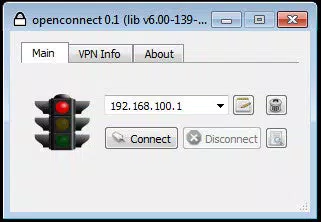
The Openconnect VPN Client presents a clean, minimalistic interface focused on functionality rather than visual flair. Navigation is straightforward, with clearly labeled fields for server address, username, and password entry, and a prominent connect/disconnect button. The layout is optimized for touch interaction, making it easy to use on smartphones and tablets.
Although the developer did not list formal performance metrics, the app is designed to operate efficiently on a range of mobile devices. Its lightweight nature suggests low memory consumption and minimal battery drain during active sessions. Responsiveness is maintained across different screen sizes, ensuring consistent usability regardless of device form factor.
Stability appears to be a priority, given the app’s long-standing presence and community support. Users can expect reliable connection establishment and maintenance, especially on networks that are compatible with the Cisco AnyConnect protocol. However, specific requirements for device performance or network conditions were not disclosed, so real-world behavior may vary based on individual configurations.
Platform Compatibility & Technical Requirements
The Openconnect VPN Client is available on Android, supporting a wide range of devices that meet the minimum OS requirements. The latest version of the app is compatible with Android 5.0 and above, though specific version details were not provided. The file size is approximately 12.5 MB, making it a lightweight download suitable for devices with limited storage.
The developer did not specify minimum OS requirements beyond the general Android platform support. Compatibility information was not fully disclosed, so users should ensure their device meets the necessary criteria before installation. The app is designed to function across different Android versions and hardware configurations, but exact performance may depend on the device’s processing power and network stability.
Pros and Cons
Pros
- Secure, encrypted connections using industry-standard protocols
- Native compatibility with Cisco AnyConnect SSL VPN networks
- Open-source and transparent development model
- Lightweight file size, ideal for mobile storage
- Intuitive interface suitable for non-technical users
Cons
- Specific technical requirements were not listed
- Compatibility with non-Cisco AnyConnect servers is not guaranteed
- Developer did not provide detailed performance benchmarks
- Limited visual customization options
- No in-app support or help center documented
FAQ
Is Openconnect VPN Client safe to use?
Yes, the app is considered secure due to its use of strong encryption and its open-source nature, which allows for public code review and transparency.
Can I use Openconnect to connect to any VPN?
No, it is specifically designed for networks that use the Cisco AnyConnect SSL VPN protocol. It may not work with other VPN types such as PPTP, L2TP, or OpenVPN.
Is the app free to download and use?
Yes, Openconnect is available at no cost. It is distributed as open-source software, meaning users can download and install it without payment.
How often is the app updated?
Updates are released periodically by the community-driven development team. The frequency depends on bug fixes, security patches, and new feature implementations.
Does Openconnect require special permissions?
While the developer did not specify the exact permissions required, typical mobile apps of this type may request network access and storage permissions for configuration files. Users should review permissions during installation.
Final Thoughts + CTA
The Openconnect VPN Client stands out as a reliable, secure, and transparent solution for users needing to connect to Cisco AnyConnect-compatible networks from mobile devices. Its open-source foundation, lightweight design, and focus on encryption make it a trustworthy tool for professionals who prioritize data security and operational efficiency. While it is not a universal VPN client, its targeted functionality delivers consistent results within its intended scope.
Individuals working remotely, IT teams managing secure access, and organizations seeking cost-effective, secure alternatives to proprietary software will find significant value in this app. It offers a balance of simplicity, performance, and trustworthiness that is rare in mobile security tools.
Download Openconnect VPN Client now to secure your remote connections and stay protected while working on the go.


